Official game
Play Leafy Corner
This game is hosted by Steam. Continue to the official page to play or download it.
Buy on SteamWhat Is Leafy Corner?
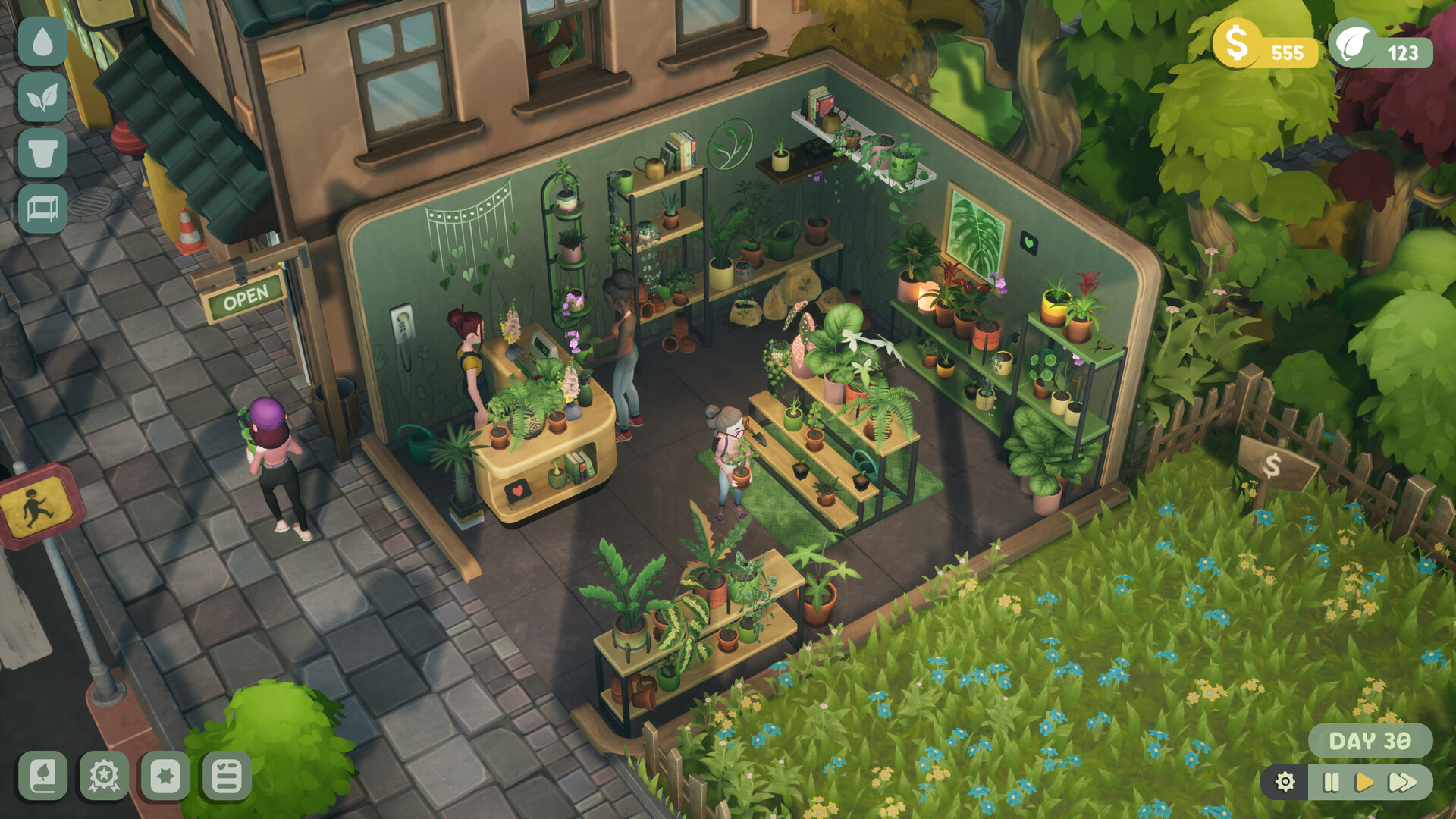
Leafy Corner is a cozy plant shop management sim where you grow, sell, and care for real-life houseplants. You run a small shop, help customers find their dream plants, fulfill orders, and customize every corner of your space.
Developed by Fireline Games and released July 30, 2026, Leafy Corner focuses on the relaxing side of running a plant shop. No hardcore economy management, no staffing headaches — just you, your plants, and your customers. The appeal is in the slow burn: watching leaves unfurl, unlocking new pots, and building a shop that actually looks like your space.
Who this is for: Anyone who finds joy in tending digital plants. Fans of Stardew Valley's farming loop but not the time pressure. Players who want a low-stakes management game they can play in short bursts or long sessions.
| Detail | Info |
|---|---|
| Developer & Publisher | Fireline Games |
| Platform | Windows, Mac (Steam) |
| Price | $7.99 |
| Players | Single-player |
| Playtime | 8–15 hours to unlock everything |
| Achievements | 26 Steam Achievements |
| Controller | Full support |
| Save System | Save anytime |
Getting Started — First Hour
Starting the Game
You begin with an empty shop, a small starting budget, a few basic plant pots, and your first set of seeds. A brief tutorial walks you through the core loop: plant → water → wait → sell.
First things to do:
-
Plant all available seeds immediately. Your starter plants take 5–15 minutes to grow. Getting them in the ground on day one means you have product to sell sooner.
-
Check your starting orders. Some customers request specific plants before you've even unlocked them. Don't stress about these — they stay open until fulfilled.
-
Spend your starting cash on one extra shelf. More display space means more plants available for sale at once. The basic wooden shelf costs $50 and pays for itself in two sales.
-
Water everything, then leave the shop. The game doesn't punish you for closing up — plants keep growing while you're away. Check back every 15-20 minutes for harvest-ready plants.
Your Shop Layout
The shop has three main areas:
- Display floor — where customers browse and buy
- Back room — where you pot new plants and store supplies
- Window display — premium spot for high-value plants
Position your most expensive plants in the window. It increases their perceived value and customers pay 10-15% more for window-displayed items.
Plant Care & Growth Mechanics
The Growth Cycle
Every plant follows the same stages:
Seed → Sprout → Young Plant → Mature → Blooming
Each stage takes a set amount of real time. Growth pauses when the plant needs water or has a pest issue.
Estimated growth times by tier:
| Tier | Example Plants | Seed to Mature | Blooming Bonus |
|---|---|---|---|
| Common | Snake Plant, Pothos | 8–12 min | +$0.50 value |
| Uncommon | Monstera, Fiddle Leaf Fig | 18–25 min | +$2 value |
| Rare | String of Pearls, Orchid | 35–50 min | +$8 value |
| Exotic | Corpse Flower, Venus Flytrap | 60–90 min | +$25 value |
Watering & Care
Each plant has a moisture bar visible when you hover over it. Let it drop below 30% and growth stops. Let it hit 0% and the plant wilts — you lose it permanently.
Watering tips:
- Group plants by watering frequency. Put succulents (water every 20 min) together and ferns (water every 8 min) on a separate shelf.
- The automatic watering can upgrade (unlocked at shop level 3) waters up to 5 plants at once. Prioritize this upgrade.
- Overwatering doesn't hurt — there's no penalty for watering a fully moist plant. When in doubt, water everything.
Variegations
Some plants spawn with variegation — unique color patterns on their leaves. These sell for 2-3x the base price and count toward specific achievements.
How variegations work:
- Every seed has a ~5% chance of producing a variegated plant
- Variegation is random, not tied to plant type or care quality
- You can't force it, but planting more seeds = more rolls at variegation
- Variegated plants can cross-breed in the nursery (unlocked at level 5) to produce new variants
Best strategy: Once you unlock the nursery, dedicate one shelf to breeding variegated plants. Cross a variegated Pothos with a variegated Snake Plant and you might get a striped hybrid worth $40+.
Customer System
Customer Types
| Type | Behavior | Best Approach |
|---|---|---|
| Casual Shopper | Buys anything under $5 | Keep $3-5 plants in easy reach |
| Plant Enthusiast | Wants specific genus, will pay premium | Stock one of every variegated type |
| Gift Buyer | Has a budget limit, needs something "nice" | Guide them to blooming plants |
| Completionist | Collects one of every plant variant | Slow burn — they return daily |
| Wholesaler | Buys in bulk (5+ identical plants) | Best for clearing inventory |
Fulfilling Orders
Orders appear on a corkboard by the register. Each order specifies:
- Plant type (or a clue like "something purple")
- Quantity
- Deadline (some orders expire)
- Reward (cash, reputation, or unlock)
Order strategy:
- Check the board before planting anything. If an order asks for 5 Monstera, dedicate shelf space accordingly.
- Expired orders don't hurt your reputation — they just disappear. Don't stretch yourself thin chasing every order.
- High-reputation customers place bigger orders. Track your reputation level in the shop menu.
Customer Satisfaction
Each customer has a patience bar. Let them wait too long and they leave. The bar drains faster if they can't find what they want.
Keep wait times low by:
- Placing bestsellers near the front
- Using the "Recommend" dialogue option (unlocked level 2) — suggests the closest match even if the exact plant isn't in stock
- Keeping at least 4-5 different plant types available at all times
Shop Customization
Unlockable Items
Customization items unlock as you gain shop levels and complete specific achievements:
| Level | Unlocks |
|---|---|
| 1 | Basic shelves, 2 pot colors |
| 2 | Wall decor, 4 pot colors, new shelf type |
| 3 | Floor tiles, automatic watering can, window display |
| 4 | Hanging planters, 6 pot colors, counter upgrade |
| 5 | Nursery, 8 pot colors, exterior sign |
| 6 | Second room, all pot colors, premium shelves |
| 7+ | Rare decor items, seasonal themes |
Design Tips
- Color coordination matters. Plants against a complementary wall color get a 5% value boost. Green plants on warm yellow walls. Purple plants on cream walls.
- Don't overcrowd. Each plant needs visual breathing room. Cramped shelves reduce perceived value by up to 20%.
- The window display is your most valuable real estate. Rotate plants through it — put new high-value plants there for the first hour, then move them to regular shelves.
- Use the "cozy" tag items early. Items tagged "cozy" increase customer dwell time (they browse longer and buy more). Rugs, soft lighting, and wooden shelves all carry this tag.
Progression & Economy
Shop Levels
Your shop levels up through a combination of:
- Total sales ($)
- Orders fulfilled
- Unique plants sold (for the catalogue)
- Shop "coziness" score (based on decor)
Each level unlocks new plants, gear, and customization options. Level 3 is the first major milestone (automatic watering can). Level 5 is the second (nursery for variegation breeding).
Money-Making Strategies
Early game (levels 1–2):
- Grow fast-turnaround plants (Snake Plant, Pothos)
- Sell at any stage — even young plants sell for 60% of mature price
- Accept every order; reputation builds faster than cash at this stage
Mid game (levels 3–5):
- Focus on uncommon plants (Monstera, Fiddle Leaf Fig)
- Use the automatic watering can to scale up production
- Save variegated plants for breeding, don't sell them raw
Late game (levels 6+):
- Run the nursery full-time breeding hybrids
- Focus on exotic plants for high-value sales
- Use the second room for bulk growing, front room for display
What to Prioritize
| Priority | Why |
|---|---|
| Automatic watering can (level 3) | Saves 50% of your active play time |
| Nursery (level 5) | Unlocks the highest-value items in the game |
| Window display | 10-15% price boost on one item |
| Second room (level 6) | Doubles your growing capacity |
| Cozy decor items | Increases customer dwell time and purchase rate |
Achievements Guide
Leafy Corner has 26 achievements. Here are the trickiest ones:
| Achievement | Requirement | Tips |
|---|---|---|
| Green Thumb | Grow 100 plants to maturity | Just keep planting. Snake Plants grow fastest. |
| Variegation Collector | Sell 10 variegated plants | Plant in bulk. 5% chance means 200 seeds for 10 variegated. |
| Hybrid Creator | Breed a hybrid in the nursery | Cross two variegated plants of different species at level 5+. |
| Shop Mogul | Earn $1,000 total | Inevitable by level 4-5. Don't grind — it happens naturally. |
| Catalogue Complete | Discover 50 unique plant types | Requires variegation + hybrids. The 50th is usually a bred hybrid. |
| Wholesale Deal | Complete a bulk order of 10+ plants | Save 10 identical common plants. Wholesaler orders appear more at higher reputation. |
| Interior Designer | Achieve max coziness score | Cover every wall and floor with decor items. Every empty square costs points. |
| Speedy Service | Serve 5 customers in under 30 seconds each late game | Upgrade your counter for faster checkout. Keep bestsellers next to register. |
System Requirements
| Component | Minimum |
|---|---|
| OS | Windows 10 (64-bit) |
| Processor | Intel Core i5-6500 or AMD equivalent |
| Memory | 4 GB RAM |
| Graphics | GeForce GTX 770 / Radeon HD 7970 |
| DirectX | Version 11 |
| Storage | 1 GB available space |
Also available on Mac. No Steam Deck verification info yet, but controller support is listed.
Final Tips
Known bugs at launch (Jul 30):
- Rarely, a customer gets stuck at the door. Save and reload to fix.
- Variegation display in the catalogue shows wrong colors for some hybrids. The plant sells correctly — the icon is just wrong.
- Shop coziness score doesn't update until you leave and re-enter the shop.
General tips:
- Save before making big decor changes. There's no undo button.
- The game saves automatically when you close the shop, but manual save is recommended before quitting.
- You can rename your shop from the settings menu. It appears on customer receipts and order forms.
- The game has a photo mode for screenshotting your shop. Use it to track your progress.
FAQ
Q: Can I play Leafy Corner on Steam Deck?
A: Full controller support is listed, though no official Steam Deck verification yet. It should work.
Q: Is there an ending?
A: No story ending. The game is open-ended — you keep growing your shop and catalogue indefinitely. The "completion" point is max level and all achievements.
Q: Can plants die permanently?
A: Yes, if their moisture hits 0% and stays there. But the game gives you plenty of warning — wilted plants have a visible droop animation.
Q: How many plants can I have at once?
A: Limited by your shelf space. Starting with 12 slots, expanding to 40+ by late game with the second room upgrade.
Q: Is there multiplayer?
A: No. Single-player only.
Q: Will there be updates?
A: Fireline Games hasn't announced a roadmap, but the game launched with full achievement support and regular patches are expected.
Screenshots