Official game
Play Code RAPID
This game is hosted by Steam. Continue to the official page to play or download it.
Wishlist on SteamOverview
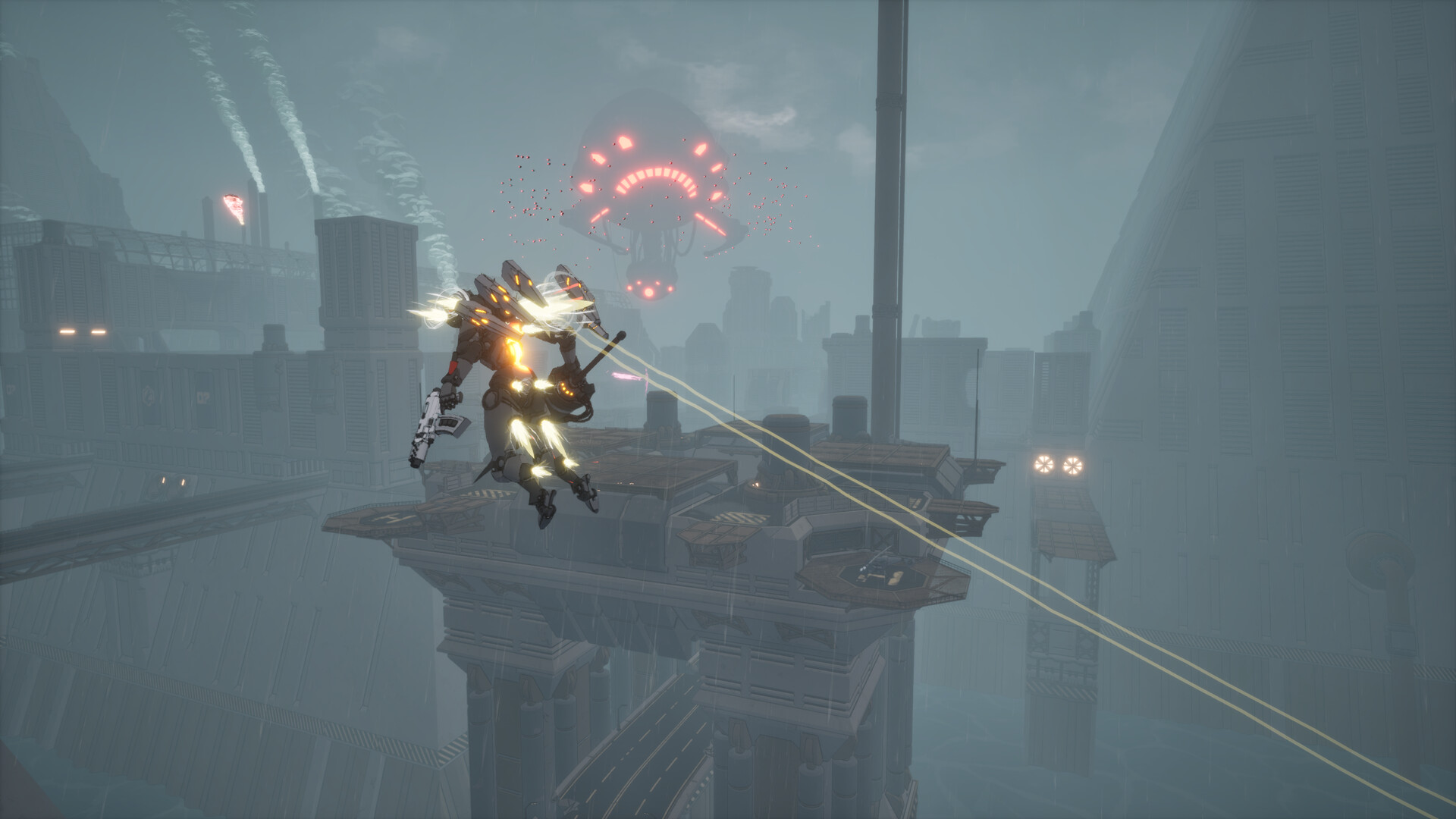
Code RAPID is a third-person action mecha game developed and published by indie studio HitBreak. Set on the distant, war-ravaged planet Ondarea, the game puts you in the cockpit of a customizable "Knight" mech and tasks you with uncovering the mystery behind the drone lands and the fall of an ancient civilization. Unlike slow, tank-like mech simulators, Code RAPID prioritizes high-speed, acrobatic combat — wall-jumping, dashing, boost-sprinting, and chaining aerial attacks are core to every encounter.
Players complete hand-crafted missions across decaying cities, snow-choked military outposts, and industrial ruins. Each mission rewards credits, weapons, and mech parts that fuel a deep loadout system. A demo was released on June 30, 2026, offering a taste of the movement system, early missions, and the build-crafting loop. The full game's release date has not been announced.
Details Table
| Attribute | Value |
|---|---|
| Title | Code RAPID |
| Steam App ID | 3499590 |
| Developer / Publisher | HitBreak |
| Engine | Internal / Unspecified |
| Genre | Action, Indie |
| Perspective | Third-Person |
| Theme | Mecha, Sci-fi, Post-apocalyptic, Mystery |
| Player Count | Single-player only |
| Release Date (Full) | To be announced |
| Demo Release | June 30, 2026 |
| Platform | Windows (Steam) |
| Controller Support | Full (gamepad recommended) |
| Steam Features | Steam Cloud, Family Sharing, Full Controller Support, DualShock Support |
| Languages | English (full audio) |
| Price (Demo) | Free |
| Price (Full Game) | TBA |
| File Size | ~30 GB |
| Rating (DEJUS) | 14+ (Violence, Inappropriate Language) |
| Rating (Germany) | 16+ (Graphic Violence, Swearing) |
| Rating (IGRS) | 18+ (Violence, Horror, Language) |
Target Audience
Code RAPID appeals to:
- Mecha fans who prefer agile, fast-moving robots over slow stompers — think Armored Core VI meets Daemon X Machina with extra verticality.
- Action-game veterans looking for a mission-based loop with deep loadout customization and replayability.
- Players who enjoy buildcrafting — tuning your Knight's body, arms, legs, weapons, and subsystems to fit a specific playstyle.
- Fans of post-apocalyptic sci-fi with environmental storytelling and mystery-box narrative.
- Indie-game enthusiasts who want to support a small studio's ambitious vision.
This game is not recommended for:
- Players seeking a PvP multiplayer experience — Code RAPID is strictly single-player.
- Fans of slow, simulation-style mech controls (MechWarrior series).
- Those avoiding demos or early-access-adjacent purchases — the full release is still TBA.
Getting Started (7 Steps)
Step 1 — Install and Launch
- Visit the Code RAPID Steam page and click Download Demo (the demo is free).
- Ensure your system meets the minimum requirements (see table below).
- Launch the game. The first boot will compile shaders — this takes 2–5 minutes depending on your CPU and GPU.
Step 2 — Complete the Tutorial Mission
The opening mission acts as a tutorial. It teaches you:
- Basic movement: walking, sprinting, jumping, wall-jumping.
- Combat basics: shooting, melee dashing, weapon switching.
- Objective navigation: following waypoints, activating terminals, scanning enemy positions.
Tip: Do not skip the text prompts. Code RAPID's control scheme is unique — the dash-melee combo and energy management are not intuitive if you skip the tutorial.
Step 3 — Understand Your Knight's Core Stats
Your mech has five core stats that affect performance:
| Stat | Effect |
|---|---|
| Speed | Movement speed and sprint multiplier. Higher = faster strafing and gap-closing. |
| Armor | Damage reduction. Determines how many hits you can take before structure damage. |
| Energy Capacity | Total energy pool used by sprinting, dashing, and special abilities. |
| Energy Regen | Rate at which energy refills while not sprinting/dashing. Critical for sustained combat. |
| Firepower | Damage multiplier for all equipped weapons. Affected by arm parts and tuning chips. |
Step 4 — Explore the Garage
Between missions, you return to the Garage (your hub). Here you can:
- Swap body frames (affect core stats and special ability).
- Equip weapon slots (primary and secondary).
- Install tuning chips (passive modifiers found in missions).
- Apply cosmetic skins (if unlocked).
- Spend credits on stat upgrades.
Step 5 — Choose Your First Real Mission
After the tutorial, three mission types are available:
- Combat Patrol — Eliminate all enemies in an arena. Best for credit farming.
- Data Recovery — Reach and hack terminals while avoiding patrols. Stealth-optional.
- Boss Probe — A shorter fight against a mini-boss. High credit payout, higher risk.
Recommendation: Start with Combat Patrol on Easy to learn enemy patterns and test loadouts.
Step 6 — Master the Credit Economy
Credits are the primary currency. You earn them by:
- Completing primary mission objectives (base payout).
- Completing optional objectives (bonus, often +30–50% of base).
- Destroying optional high-value targets marked with a skull icon (jackpot).
- Collecting credit caches hidden in side paths (exploration reward).
Rule of thumb: If you finish a mission with 80%+ optional objectives completed, you're earning efficiently. Below 50%, you're leaving money on the table.
Step 7 — Iterate Your Loadout
After each mission, return to the Garage and spend credits. The first upgrades to prioritize:
- Energy Capacity (most important — enables more dashes and sprint uptime).
- Speed (makes missions faster, which means more credits per hour).
- Firepower (only after you have a weapon that scales well with it).
Advanced Tips
| Mistake | Why It Hurts | How to Fix |
|---|---|---|
| Hoarding credits | Upgrades compound; spending early makes farming faster. | Buy the cheapest speed or energy upgrade after every mission. |
| Ignoring energy management | Running out of energy mid-combat = eat every attack. | Watch the energy bar. Disengage and recharge behind cover when it hits 20% during a fight. |
| Standing still while shooting | You lose the mobility advantage — enemies will land hits. | Always be moving. Use sprint-strafing and short dashes to weave between shots. |
| Using one loadout for every mission | Enemies have resistances and patrol patterns that counter a single setup. | Inspect the mission briefing. Equip a precision weapon for open arenas, shotguns for tight interiors. |
| Skipping side paths | Missed tuning chips and credit caches slow your progression curve. | Before extracting, sweep the perimeter. Explore every branching corridor. |
| Forgetting to scan | Unseen enemies get the drop on you, often with one-shot heavy attacks. | Hold the scan key (default: E) at terminals or use the scan ability before engaging. |
| Dashing backward from rockets | Rockets have splash; backing up keeps you in the blast radius. | Dash perpendicular (left or right) to the rocket's trajectory. |
| Ignoring melee | Melee dash staggers enemies and sets up burst combos. | Weave a dash-melee into your rotation before unloading a secondary weapon. |
| Over-upgrading one stat | Diminishing returns kick in past certain thresholds. | Spread points evenly across Speed, Energy, and Armor early-game. |
| Selling all weapons | Some weapons are situationally excellent even if weak on paper. | Keep at least one of each weapon type. Swap based on mission terrain. |
Core Mechanics
1. High-Mobility Movement System
Code RAPID's signature mechanic is its movement. Your Knight can:
- Sprint (hold Shift) — drains energy, boosts ground speed. Used for closing gaps and strafing.
- Dash (Space while moving) — quick invincibility-frame dodge. Costs a chunk of energy. Can be chained up to 2 times before cooldown.
- Wall-Jump — Jump while touching a wall surface. Resets your dash cooldown. Critical for vertical combat.
- Boost Jump (hold Jump) — a charged jump that launches you upward at the cost of extra energy.
Advanced movement chain: Sprint → Dash → Wall-Jump → Air Dash → Boost Jump. This sequence carries you across most arenas in seconds and makes you nearly untouchable — but burns through your energy bar rapidly.
Terrain knowledge is as important as reflexes. Each mission arena has:
- Wall-running surfaces (glowing blue lines on certain walls).
- Launch pads (green panels that boost you skyward).
- Zip-line points (poles with glowing tops that let you traverse long distances).
- Cover geometry (half-walls, pillars, collapsed structures for energy regen).
2. Build Customization (The Knight System)
Your mech, called a Knight, is assembled from four part categories:
| Part Slot | What It Affects | Examples |
|---|---|---|
| Body Frame | Core stats (Speed, Armor, Energy) + special ability | Light Scout Frame (high speed, low armor), Heavy Assault Frame (high armor, slow), Balanced Frame |
| Weapon Slots (x2) | Damage output, range, ammo, fire rate | Rifle (precision), Shotgun (burst), Rocket Launcher (AoE), Energy Lance (charge), Vulcan (sustained fire) |
| Leg Unit | Sprint speed, dash distance, jump height, wall-jump angle | Stabilizer Legs (better ground traction), Thruster Legs (longer air dashes), Spring Legs (higher jumps) |
| Tuning Chips (x3 slots) | Passive bonuses — stat boosts, special effects | Overclock Chip (+energy regen), Armor Weave (+damage reduction), Ammo Extender (+magazine size), Loot Radar (highlights collectibles) |
Synergy example: Light Scout Frame + Thruster Legs + Overclock Chip + Energy Lance creates a hit-and-run build that dashes in, stabs, dashes out, and recharges quickly.
3. Mission Structure & Objectives
Each mission follows a predictable loop but varies in layout:
- Deployment — Drop into the arena from an orbital pod. Briefing overlay shows primary objective, optional objectives, and enemy composition.
- Exploration Phase — Navigate the arena. Scan terminals for intel. Locate enemies on the minimap.
- Combat Phase — Engage enemies. Each enemy type has distinct behavior (see Advanced Strategies).
- Objective Completion — Hack the data terminal / eliminate all flagged targets / reach the extraction point.
- Extraction — Reach the LZ and call the pickup ship. Enemies spawn in waves during extraction to prevent camping.
- Results — Credits earned, bonuses tallied, tuning chip discoveries recorded.
Optional objectives are the difference between good runs and great runs. Examples:
- "Destroy 3 anti-air turrets"
- "Complete mission without taking structure damage" (energy damage allowed)
- "Locate and hack all 4 data logs"
- "Eliminate the roaming HVTs (High-Value Targets)"
4. Weapon Types & Damage Profiles
Every weapon falls into one of three damage categories:
| Category | Penetration vs Armor | Effective Range | Example Weapons |
|---|---|---|---|
| Kinetic | Standard | Medium-Long | Assault Rifle, Vulcan Cannon, Sniper Rifle |
| Energy | High vs Shields, Low vs Heavy Armor | Medium | Plasma Pistol, Energy Lance, Beam Rifle |
| Explosive | Ignores armor tiers, reduced vs shields | Short-Medium | Rocket Launcher, Grenade Launcher, Micro-Missile Pod |
Key rule: Match damage type to enemy composition visible in the mission briefing. Energy weapons shred shielded drone swarms but tickle heavy tanks. Explosives clear clustered infantry but struggle against single fast-moving targets.
5. Energy & Heat Management
Beyond the energy bar used for mobility, each weapon generates heat when fired. Overheating triggers a forced cooldown animation (~3 seconds) during which you cannot fire. Manage heat by:
- Firing in controlled bursts (tap-firing for precision weapons).
- Switching weapons to let one cool while using the other.
- Installing Heat Sink tuning chips.
Yellow heat bar = warning zone. Red = imminent overheat. Skilled players ride the yellow line for maximum DPS without locking up.
Advanced Strategies
1. The Perpendicular Dodge
Rocket launchers and explosive drones fire projectiles with splash damage. The natural instinct is to backpedal — but backing up keeps you inside the blast radius. Instead:
- Identify the firing enemy.
- Wait for the wind-up flash.
- Dash perpendicular (90° left or right from the projectile path).
- Immediately after the dodge, sprint in the new direction.
This works because splash damage is modeled as a sphere — moving laterally exits the radius in fewer frames than moving backward.
2. Vertical Ambush Setup
Many arenas are multi-tiered. Use the height advantage:
- Approach the encounter zone from above using wall-jumps and boost jumps.
- Do not engage immediately. Let enemies path toward your last known ground position.
- Once they cluster below you, drop down and activate your special ability (AoE if available) or fire an explosive weapon into the group.
- Follow up with dash-melee on survivors before they reorient.
Enemy AI limitation: Most ground units have a 45° upward tracking cone. Above 45°, their accuracy degrades significantly.
3. The Credit-Farming Loop
To maximize credits per minute:
- Select Combat Patrol missions with the highest bonus objectives.
- Bring a mobile build (Light Scout Frame + Thruster Legs).
- Ignore trash mobs initially — sprint to optional objectives first.
- Clear all optional objectives before tackling the primary.
- Use explosive weapons on grouped enemies to save time.
- Do not wait for energy to fully recharge between fights — maintain 30%+ and use cover.
Efficiency target: A clean sub-8-minute Combat Patrol run with all bonuses should net ~1,200–1,500 credits. Compare to a slow 15-minute run with only primary objective (~400–600 credits).
4. The Shield-Bypass Combo
Certain late-mission enemies (elite shield drones, shielded commanders) have energy shields that absorb kinetic and explosive damage until depleted. The fastest way to deal with them:
- Open with Energy Lance or Beam Rifle (energy damage depletes shields 3x faster than kinetic).
- As the shield breaks, switch to a Shotgun or Vulcan Cannon.
- Dash-melee to stagger, then unload the full magazine.
The timing window between shield break and shield regen is ~2 seconds. Executing this combo correctly kills shielded elites in one exchange instead of a drawn-out attrition war.
5. Speedrunner's Route Planning
For players aiming for S-rank clears:
- Memorialize spawn points. Enemy spawns and patrol routes are fixed in each mission. Learn them.
- Chain movement abilities (Sprint → Dash → Wall-Jump → Air Dash → Boost Jump) to skip large sections of ground.
- Use weapon quick-swap. Never manually reload in combat — switch to the second weapon and let the first auto-reload in the holster.
- Skip cutscenes after the first playthrough. All mission briefings can be dismissed.
- Prioritize HVTs (High-Value Targets) — they drop bonus credits and rare tuning chips, which compound into faster future runs.
FAQ
Q1: Is Code RAPID a roguelike?
No. It is a mission-based action game with persistent upgrades between missions. Levels are hand-crafted, not procedurally generated, and there is no permadeath.
Q2: Will there be multiplayer or co-op?
HitBreak has not announced any multiplayer or co-op modes. The focus is entirely on a single-player campaign experience.
Q3: How long is the demo?
The demo includes the tutorial, three full missions (Combat Patrol, Data Recovery, Boss Probe), and access to the Garage for basic loadout experimentation. Estimated playtime: 1.5–2.5 hours depending on exploration.
Q4: Does progress carry from the demo to the full game?
HitBreak has stated that demo save files will carry over to the full release. Your credits, unlocks, and tuning chips will transfer.
Q5: What are the system requirements for the full game?
Minimum: Windows 8/10/11, Intel Core i5-8400 / Ryzen 5 2600, 8 GB RAM, GTX 1050 Ti / GTX 1650 / RX 570 (4 GB VRAM), 30 GB storage, DirectX 11. Recommended: i7-8700 / R7 2700X, 16 GB RAM, RTX 3060 / RX 6800 XT, DirectX 12.
Q6: Are there difficulty settings?
Yes. The demo offers Easy, Normal, and Hard difficulty levels, which affect enemy damage, health, and the number of bonus objectives required for full credit payout.
Q7: Can I rebind controls?
Yes. The settings menu supports full key rebinding for keyboard/mouse and controller inputs. DualShock controllers are natively supported.
Q8: Is there a photo mode?
Not confirmed at this time. The developer has not announced a photo mode feature.
Q9: What happens when I die in a mission?
You restart from the last checkpoint. Checkpoints are typically placed at major area transitions and after optional objective completions. There is no lives system or mission failure state — you can retry as many times as needed.
Q10: Does Code RAPID have Steam Achievements?
The store page lists Steam features but achievements have not been confirmed yet. Full game features may differ from the demo.
Q11: Are there different endings?
Unknown. The demo does not reveal the campaign structure, but the narrative premise (questioning "a connection that never truly existed") suggests story branches are possible.
Q12: Will there be paid DLC?
No DLC has been announced beyond the full game. The Steam DLC page (appid 4841090) currently points only to the demo.
Final Tip & Verdict
Final Tip: The single most impactful skill to develop in Code RAPID is energy management through movement. Your energy bar dictates everything — offense (dash-melee combos), defense (dodge i-frames), and positioning (wall-jumps and boost jumps). Treat energy as a resource to be spent aggressively but not depleted below 15% in active combat. The best Code RAPID players are the ones who are sprinting when they could walk, wall-jumping when they could run around, and dashing through attacks instead of away from them.
Verdict: Code RAPID is shaping up to be a standout indie mecha action title. Its high-mobility combat sets it apart from the genre's usual slow-and-heavy approach, and the deep customization system offers genuine replayability. The demo is generous, well-polished, and gives a confident first impression of HitBreak's vision. If you've been craving fast-paced mecha combat with meaningful buildcrafting, this is one to watch — and the demo is absolutely worth your time right now.
Guide originally researched and compiled by Game How To Editorial. Last updated July 2026. Based on Code RAPID Demo v1.0 (Steam, June 30, 2026). Full game details subject to change before official release.
Screenshots